How to Remove Unwanted Things, Like Your Ex, From Old Photos

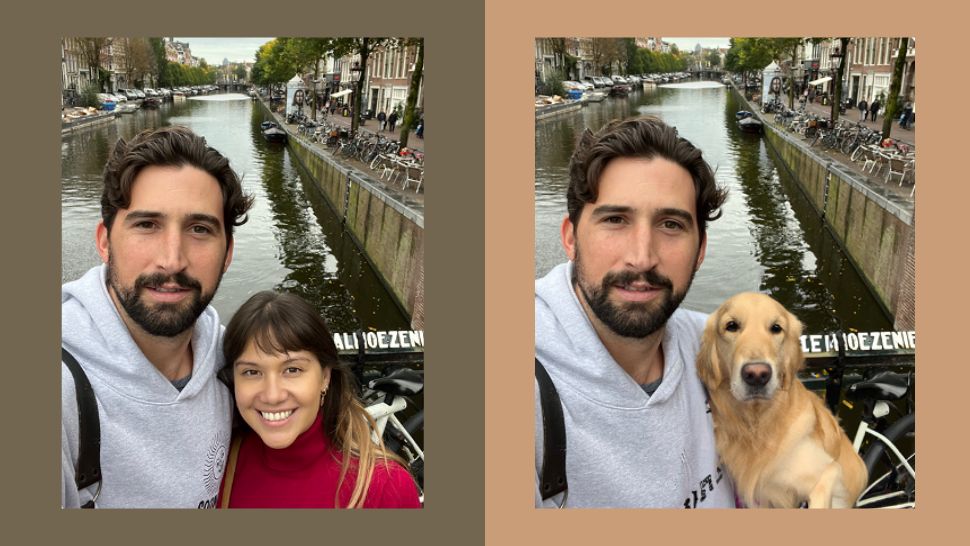
Picsart is out here doing God’s work. The photo editing platform’s new feature AI Replace arrived just in time for Valentine’s Day. If you’re ready to cleanse your life of all that toxic energy your ex left behind, this feature lets you do just that with just a few taps on your phone.
More: 10 Toxic Valentine's Day Movies That'll Make You Grateful You're Single
Replace unwanted things in photos, like he-or-she-who-must-not-be-named, using AI Replace. Instead of your crusty ex, AI Replace can edit a dog into the photo. At least your dog’s got loyalty.
Or maybe something more appropriate could take your ex’s place in the photo, like a snake.

Or maybe a giant red flag since you were blind to them in the first place.

AI Replace lets you, quite literally, erase an unwanted thing or person from your life. Just download Picsart for iOS, upload a photo, scroll down to “Draw” on the toolbar, and find “AI Replace.” From there, highlight the unwanted thing or person you want to replace then describe in words what you want to replace them with. Anything goes with AI Replace. You could input “a piece of steak,” and the AI would add an extension of your arm to the photo to make it make sense.

Unfortunately, AI Replace is only on iOS for now, so Android users might have to erase their bad memories manually or on other apps.
As for iOS users, get started on your V-Day cleanse now.