Netflix Launches Mobile Feature That Lets You Save and Share Your Favorite Scenes

Imagine this: You finally see your favorite Netflix series couple lock lips but have no way to screencap (hello: black screen) and share it with your binge-watching friends. Or, you're narrating a scene to someone but having a hard time rewinding and finding that exact scene on the show's timeline.
With this in mind, the streaming service announced on Monday, October 28, that they're launching a new mobile feature called Moments. It lets you easily save a specific scene and share that 'moment' on your social media platforms.
ALSO READ
The 25 Best Netflix Original Movies, Ranked
Looking Back at When Netflix Was Just a Movie Rental Company
How Netflix Moments Works
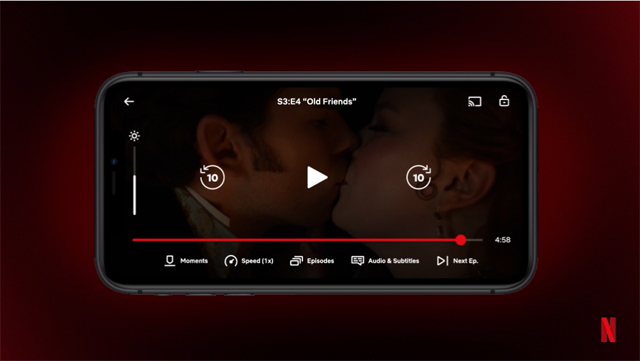
When you come across a favorite scene on Netflix, just tap 'Moments' at the bottom of the screen. The moment will automatically save to your My Netflix tab.
From there, you can check out the saved scene on your phone anytime or play from that moment when you want to rewatch the episode.
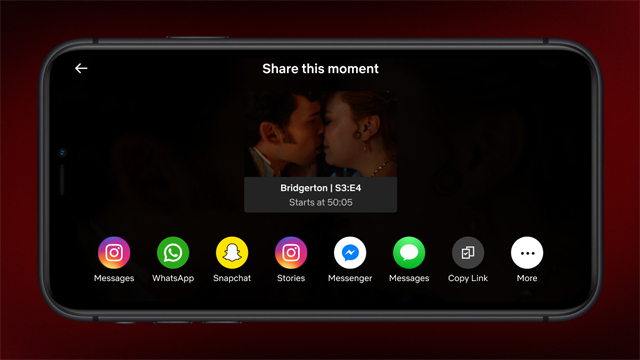
You can also share that saved moment on Instagram, Facebook, and other social media platforms.
Moments coincides with the launch of Netflix' newest global campaign called "It's so Good," which also features Simone Biles, Cardi B, and Giancarlo Esposito talking about their favorite scenes.
Moments was globally rolled out on the iOS app on Monday. Netflix Philippines confirmed this with Esquire Philippines as well. Moments for Android users will follow soon.